If you are facing an issue with MyStuff 2.0 Sign In or are unsure which login option to use, this guide is for you. MyStuff 2.0 is associated with McDonald’s employee access in the UK and Republic of Ireland, and the sign-in method depends on your location and account type.
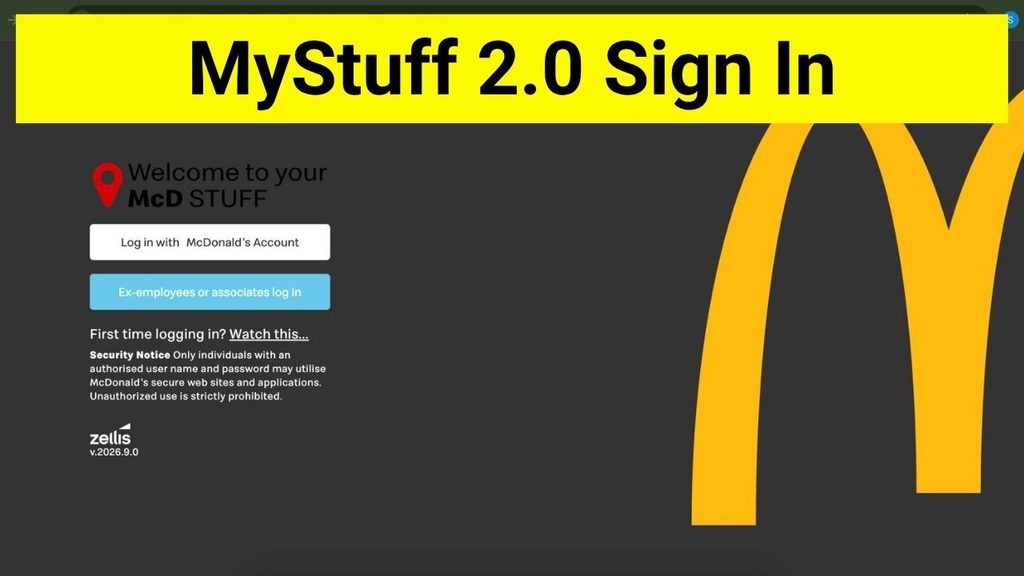
MyStuff 2.0 Sign In
MyStuff 2.0 Sign In is used by authorized McDonald’s employees to access employee-related services. The system is not intended as a public customer account. Depending on whether you are in the UK or Republic of Ireland, you may use different credentials to access the portal.
MyStuff 2.0 Sign In Overview
| Detail | Information |
|---|---|
| Portal | MyStuff 2.0 / Employee Access |
| Main users | McDonald’s employees |
| Regions | UK and Republic of Ireland |
| UK sign-in | McDonald’s ID and password through Single Sign-On |
| Republic of Ireland sign-in | BrandMate account |
| Password recovery | Available on the login page |
| Access | Authorized employees only |
What Is MyStuff 2.0?
MyStuff 2.0 refers to an employee-access system associated with McDonald’s UK and Republic of Ireland. Employees can use the related People Stuff services to manage several workplace tasks, including holidays, personal information, training, and online payslips.
Because the portal is designed for employees, you generally need an employer-provided account or authorized credentials to sign in.
MyStuff 2.0 Sign In: Official Login Page
To access the MyStuff 2.0 sign in page, use: https://mcdonalds-uk-roi.brandm8.com/account/login
Always check the website address before entering your username, password, or other account information. Avoid unofficial websites that use similar names or claim to provide MyStuff 2.0 access.
How to Sign In to MyStuff 2.0 in the UK
UK employees use the Single Sign-On (SSO) option available on the login page.
Follow these steps:
- Open the MyStuff 2.0 login page.
- Select the Single Sign-on option.
- Enter your McDonald’s ID when prompted.
- Enter your McDonald’s password.
- Complete any additional authentication requested by the Global SSO/Entra ID system.
- After successful authentication, you should be taken to the employee portal.
Make sure you are using your employer-provided McDonald’s account rather than a personal email or unrelated login.
MyStuff 2.0 Sign In for Republic of Ireland
Employees in the Republic of Ireland use a BrandMate account to sign in.
The basic procedure is:
- Visit the MyStuff 2.0 login page.
- Select the appropriate BrandMate sign-in option.
- Enter your BrandMate account credentials.
- Complete any requested verification.
- Continue to the employee portal after successful authentication.
If your BrandMate credentials do not work, check that you are using the account provided for your McDonald’s employee access.
What Can You Access After Signing In?
After signing in, eligible employees may be able to use People Stuff-related services for workplace tasks such as:
- Checking and managing holidays
- Updating personal details
- Completing or accessing training
- Viewing online payslips
- Managing other employee information and services
The exact options available can depend on your role, location, and access permissions.
MyStuff 2.0 Sign In Not Working? Try These Fixes
If you cannot sign in, try the following troubleshooting steps:
1. Check the login method
Make sure you are using the correct option for your region. UK employees use McDonald’s Single Sign-On, while Republic of Ireland employees use a BrandMate account.
2. Check your credentials
Carefully check your McDonald’s ID, BrandMate username, and password. Watch for typing errors, unnecessary spaces, or incorrect capitalization where applicable.
3. Use password recovery
If you have forgotten your password, use the password-recovery option on the login page rather than repeatedly entering an incorrect password.
4. Check your account access
MyStuff 2.0 is intended for authorized employees. If you are a new employee or your account has not yet been activated, you may need to contact your manager or the appropriate McDonald’s support team.
5. Try another browser
If the page does not load correctly, try refreshing the page or using another supported browser. Clearing cached browser data can also help with certain login problems.
Is MyStuff 2.0 for McDonald’s Customers?
No. MyStuff 2.0 is associated with employee access, particularly for McDonald’s UK and Republic of Ireland staff. It should not be confused with McDonald’s public customer services or ordering accounts.
Stay Safe When Signing In
Be careful when searching for MyStuff 2.0 online. Look-alike websites can appear in search results and may attempt to collect login information.
Before signing in:
- Check the website address carefully.
- Use the employer-provided login credentials.
- Do not share your password with anyone.
- Avoid entering credentials on unofficial MyStuff websites.
- Use the official login page or an employer-provided link whenever possible.
Frequently Asked Questions
MyStuff 2.0 Sign In provides authorized McDonald’s UK and Republic of Ireland employees with access to employee services and related People Stuff features.
UK employees select the Single Sign-On option and authenticate using their McDonald’s ID and password through the Global SSO/Entra ID system.
Republic of Ireland employees use their BrandMate account to access the system.
Use the password-recovery option provided on the login page. If you cannot recover your account, contact your manager or the appropriate McDonald’s support channel.
No. Access is intended for authorized McDonald’s employees, and available services may vary according to your role and location.